Post Purchase Setup
ReKeepIt Post Purchase
ReKeepIt's new post-purchase campaign offers a win-win for brands and customers: brands provide attractive discounts to those who agree to non-returnable purchases, enhancing customer satisfaction and securing sales more effectively.
Setup Overview
Setting up involves two key components:
-
Grant API Keys: This is crucial for linking both your returns management service and your email marketing tool. You'll need to generate and authorize ReKeepIt API keys for seamless communication between these platforms.
-
Setup Klaviyo Flows and Email Templates: Klaviyo integration is a vital part of your email marketing strategy. You have two options for setting up Klaviyo flows:
- Do it for me: Our dedicated team can configure this for you as a complimentary service. We'll set you up with a standard email template to get you started quickly.
- I'll set it up myself: If you prefer a hands-on approach, you can set up Klaviyo flows by yourself. We provide detailed guidelines to assist you in this process.
Grant API Keys
For assistance in sharing API keys, please reach out to our engineering team at engineering@rekeepit.com. For security reasons, please do not email API keys directly. We will provide a secure means to share API keys.
Loop
- Access Loop Developer Settings: Visit the Loop developer settings page at Loop Developer Settings.
- Follow Loop's Instructions: On the Loop developer settings page, you will find detailed instructions on how to issue an API key. Ensure that the Orders Scope is included as per the Orders Scope documentation.
Klaviyo
For Klaviyo integration, ReKeepIt requires a custom API key with access to the Events Scope. This permission is necessary for ReKeepIt to send events that trigger Klaviyo Flows.
If you are opting for us to set this up for you, we'll need a manager
credentials assigned to engineering@rekeepit.com and the rest can be completed
by ReKeepIt. Please follow this process.
- Access Klaviyo API Credentials: Go to Klaviyo’s API credentials page at Klaviyo API Credentials.
- Follow Klaviyo’s Instructions: The Klaviyo API credentials page provides
a step-by-step guide on creating a custom API key. Ensure that you grant
access to
/api/eventsas detailed in the Events Scope documentation.
For any further assistance or specific queries, feel free to contact our engineering team at engineering@rekeepit.com.
Setup Klaviyo Flows by ReKeepIt
To initiate the setup of Klaviyo flows for your Shopify store please contact our engineering team at engineering@rekeepit.com.
We require Manager access to your Klaviyo account to set up the flows. Please
follow this process
to grant Manager access to engineering@rekeepit.com.
Setup Klaviyo Flows by Merchant
Note that if ReKeepIt takes over the setup of Klaviyo flows, there's no need to do the following. If you'd prefer to set up the Klaviyo Flows on your own, you can do the following.
Klaviyo Email Flows
The email flows are activated by specific event triggers. These events originate from our system and must be registered to Klaviyo's metrics system to be visible on the flow dashboard. When you install our app and provide the necessary API keys, we automatically register these events with Klaviyo.
To verify the presence of these events, please sign in to your Klaviyo account.
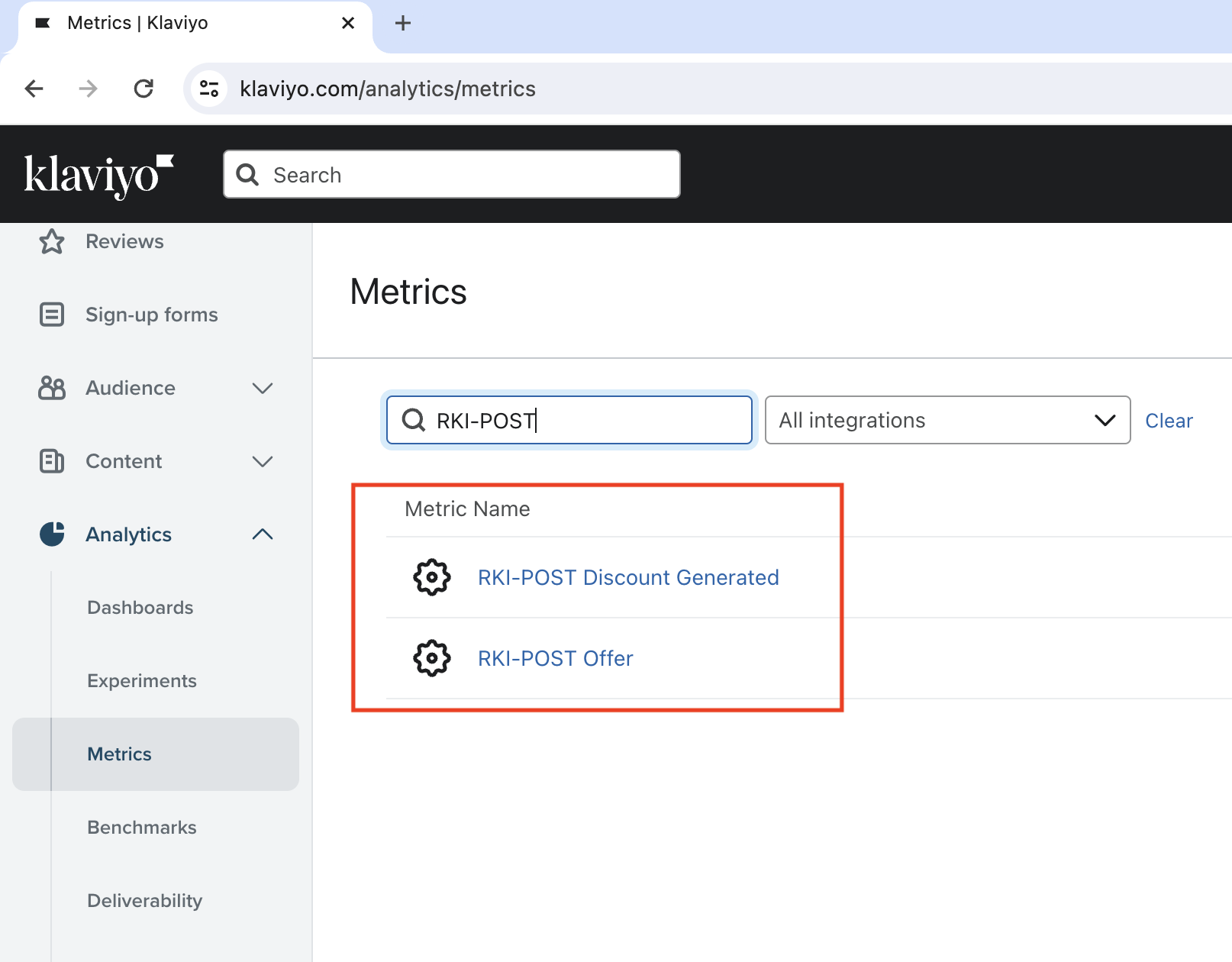
Navigate to Klaviyo Metrics and
search for the metric RKI-POST. You should be able to see the metric as shown
in the image below:
If you are unable to find the RKI-POST metric, we will need to address this
before moving forward. In such a case, please reach out to our engineering team
at engineering@rekeepit.com for assistance in
registering the metrics.
Uploading email templates
These are the templates.
Offer Email Template
Offer Email Template
<!DOCTYPE html>
<html xmlns="http://www.w3.org/1999/xhtml" xmlns:o="urn:schemas-microsoft-com:office:office" xmlns:v="urn:schemas-microsoft-com:vml">
<head>
<title>
</title>
<!--[if !mso]><!-->
<meta content="IE=edge" http-equiv="X-UA-Compatible"/>
<!--<![endif]-->
<meta content="text/html; charset=utf-8" http-equiv="Content-Type"/>
<meta content="width=device-width, initial-scale=1" name="viewport"/>
<!--[if mso]>
<noscript>
<xml>
<o:OfficeDocumentSettings>
<o:AllowPNG/>
<o:PixelsPerInch>96</o:PixelsPerInch>
</o:OfficeDocumentSettings>
</xml>
</noscript>
<![endif]-->
<!--[if lte mso 11]>
<style type="text/css" data-inliner="ignore">
.mj-outlook-group-fix { width:100% !important; }
</style>
<![endif]-->
<!--[if !mso]><!--><!--<![endif]-->
<style>a:link {color:#3716FF;font-weight:bold;text-decoration:underline none;font-style:normal}
a:visited {color:#3716FF;font-weight:bold;text-decoration:underline none;font-style:normal}
a:active {color:#3716FF;font-weight:bold;text-decoration:underline none;font-style:normal}
a:hover {color:#3716FF;font-weight:bold;text-decoration:underline none;font-style:normal}</style><style>@import url(https://static-forms.klaviyo.com/fonts/api/v1/YfTfty/custom_fonts.css);
#outlook a {
padding: 0
}
body {
margin: 0;
padding: 0;
-webkit-text-size-adjust: 100%;
-ms-text-size-adjust: 100%
}
table, td {
border-collapse: collapse;
mso-table-lspace: 0;
mso-table-rspace: 0
}
img {
border: 0;
line-height: 100%;
outline: none;
text-decoration: none;
-ms-interpolation-mode: bicubic
}
p {
display: block;
margin: 13px 0
}
@media only screen and (min-width: 480px) {
.mj-column-per-100 {
width: 100% !important;
max-width: 100%
}
}
.moz-text-html .mj-column-per-100 {
width: 100% !important;
max-width: 100%
}
@media only screen and (max-width: 480px) {
div.kl-row.colstack div.kl-column {
display: block !important;
width: 100% !important
}
}
.hlb-subblk td {
word-break: normal
}
@media only screen and (max-width: 480px) {
.hlb-wrapper .hlb-block-settings-content {
padding: 9px !important
}
.hlb-logo {
padding-bottom: 9px !important
}
.r2-tbl {
width: 100%
}
.r2-tbl .lnk {
width: 100%
}
.r2-tbl .hlb-subblk:last-child {
padding-right: 0 !important
}
.r2-tbl .hlb-subblk {
padding-right: 10px !important
}
.kl-hlb-stack {
display: block !important;
width: 100% !important;
padding-right: 0 !important
}
.kl-hlb-stack.vspc {
margin-bottom: 9px
}
.kl-hlb-wrap {
display: inline-block !important;
width: auto !important
}
.kl-hlb-no-wrap {
display: table-cell !important
}
.kl-hlb-wrap.nospc.nospc {
padding-right: 0 !important
}
}
@media only screen and (max-width: 480px) {
.component-wrapper .mob-no-spc {
padding-left: 0 !important;
padding-right: 0 !important
}
}
@media only screen and (max-width: 480px) {
.kl-text {
padding-right: 18px !important;
padding-left: 18px !important
}
}
.kl-button a {
display: block !important
}
@media only screen and (max-width: 480px) {
.kl-table-subblock.use-legacy-mobile-padding {
padding-left: 9px !important;
padding-right: 9px !important
}
}
@media only screen and (max-width: 480px) {
td.kl-img-base-auto-width {
width: 100% !important
}
}
@media screen and (max-width: 480px) {
.kl-sl-stk {
display: block !important;
width: 100% !important;
padding: 0 0 9px !important;
text-align: center !important
}
.kl-sl-stk.lbls {
padding: 0 !important
}
.kl-sl-stk.spcblk {
display: none !important
}
}
@media only screen and (max-width: 480px) {
table.mj-full-width-mobile {
width: 100% !important
}
td.mj-full-width-mobile {
width: auto !important
}
}
img {
border: 0;
height: auto;
line-height: 100%;
outline: none;
text-decoration: none;
max-width: 100%
}
.root-container {
background-repeat: no-repeat !important;
background-size: cover !important;
background-position: right bottom !important
}
.root-container-spacing {
padding-top: 50px !important;
padding-bottom: 20px !important;
font-size: 0 !important
}
.content-padding {
padding-left: 0 !important;
padding-right: 0 !important
}
.content-padding.first {
padding-top: 0 !important
}
.content-padding.last {
padding-bottom: 0 !important
}
@media only screen and (max-width: 480px) {
td.mobile-only {
display: table-cell !important
}
div.mobile-only {
display: block !important
}
table.mobile-only {
display: table !important
}
.desktop-only {
display: none !important
}
}
@media only screen and (max-width: 480px) {
.table-mobile-only {
display: table-cell !important;
max-height: none !important
}
.table-mobile-only.block {
display: block !important
}
.table-mobile-only.inline-block {
display: inline-block !important
}
.table-desktop-only {
max-height: 0 !important;
display: none !important;
mso-hide: all !important;
overflow: hidden !important
}
}
p {
margin-left: 0;
margin-right: 0;
margin-top: 0;
margin-bottom: 0;
padding-bottom: 1em
}
@media only screen and (max-width: 480px) {
.kl-text > div, .kl-table-subblock div, .kl-split-subblock > div {
font-size: 14px !important;
line-height: 1.3 !important
}
}
h1 {
color: #3716FF;
font-family: Helvetica, Arial, sans-serif;
font-size: 64px;
font-style: normal;
font-weight: 700;
line-height: 1.3;
letter-spacing: 0;
margin: 0;
margin-bottom: 20px;
text-align: left
}
@media only screen and (max-width: 480px) {
h1 {
font-size: 40px !important;
line-height: 1.1 !important
}
}
h2 {
color: #3716FF;
font-family: Helvetica, Arial, sans-serif;
font-size: 20px;
font-style: normal;
font-weight: 700;
line-height: 1.1;
letter-spacing: 0;
margin: 0;
margin-bottom: 16px;
text-align: left
}
@media only screen and (max-width: 480px) {
h2 {
font-size: 32px !important;
line-height: 1.1 !important
}
}
h3 {
color: #3716FF;
font-family: Helvetica, Arial, sans-serif;
font-size: 18px;
font-style: normal;
font-weight: 700;
line-height: 1.3;
letter-spacing: 0;
margin: 0;
margin-bottom: 12px;
text-align: left
}
@media only screen and (max-width: 480px) {
h3 {
font-size: 24px !important;
line-height: 1.1 !important
}
}
h4 {
color: #3716FF;
font-family: Helvetica, Arial, sans-serif;
font-size: 16px;
font-style: normal;
font-weight: 700;
line-height: 1.3;
letter-spacing: 0;
margin: 0;
margin-bottom: 9px;
text-align: left
}
@media only screen and (max-width: 480px) {
h4 {
font-size: 18px !important;
line-height: 1.1 !important
}
}
@media only screen and (max-width: 480px) {
.root-container {
width: 100% !important
}
.root-container-spacing {
padding: 10px !important
}
.content-padding {
padding-left: 0 !important;
padding-right: 0 !important
}
.content-padding.first {
padding-top: 0 !important
}
.content-padding.last {
padding-bottom: 0 !important
}
.component-wrapper {
padding-left: 0 !important;
padding-right: 0 !important
}
}</style></head>
<body style="word-spacing:normal;background-color:#FFFFFF;">
<div class="root-container" id="bodyTable" style="background-color:#FFFFFF;">
<div class="root-container-spacing">
<table align="center" border="0" cellpadding="0" cellspacing="0" class="kl-section" role="presentation" style="background:#FFFFFF;background-color:#FFFFFF;width:100%;">
<tbody>
<tr>
<td>
<!--[if mso | IE]><table align="center" border="0" cellpadding="0" cellspacing="0" class="kl-section-outlook" style="width:600px;" width="600" bgcolor="#FFFFFF" ><tr><td style="line-height:0px;font-size:0px;mso-line-height-rule:exactly;"><![endif]-->
<div style="margin:0px auto;max-width:600px;">
<table align="center" border="0" cellpadding="0" cellspacing="0" role="presentation" style="width:100%;">
<tbody>
<tr>
<td style="border-bottom:solid 1px #BCAFFF;border-left:solid 1px #BCAFFF;border-right:solid 1px #BCAFFF;border-top:solid 1px #BCAFFF;direction:ltr;font-size:0px;padding:0px;text-align:center;">
<!--[if mso | IE]><table role="presentation" border="0" cellpadding="0" cellspacing="0"><table align="center" border="0" cellpadding="0" cellspacing="0" class="" style="width:600px;" width="600" bgcolor="#FFFFFF" ><tr><td style="line-height:0px;font-size:0px;mso-line-height-rule:exactly;"><![endif]-->
<div style="background:#FFFFFF;background-color:#FFFFFF;margin:0px auto;border-radius:0px 0px 0px 0px;max-width:600px;">
<table align="center" border="0" cellpadding="0" cellspacing="0" role="presentation" style="background:#FFFFFF;background-color:#FFFFFF;width:100%;border-radius:0px 0px 0px 0px;">
<tbody>
<tr>
<td style="direction:ltr;font-size:0px;padding:20px 0;padding-bottom:0px;padding-left:0px;padding-right:0px;padding-top:0px;text-align:center;">
<!--[if mso | IE]><table role="presentation" border="0" cellpadding="0" cellspacing="0"><![endif]-->
<div class="content-padding first">
<!--[if true]><table border="0" cellpadding="0" cellspacing="0" width="598" style="width:598px;direction:ltr"><tr><![endif]-->
<div class="kl-row colstack" style="display:table;table-layout:fixed;width:100%;">
<!--[if true]><td style="vertical-align:top;width:598px;"><![endif]-->
<div class="kl-column" style="display:table-cell;vertical-align:top;width:100%;">
<div class="mj-column-per-100 mj-outlook-group-fix component-wrapper hlb-wrapper" style="font-size:0px;text-align:left;direction:ltr;vertical-align:top;width:100%;">
<table border="0" cellpadding="0" cellspacing="0" role="presentation" style="width:100%;" width="100%">
<tbody>
<tr>
<td class="hlb-block-settings-content" style="background-color:#E9E6F4;vertical-align:top;padding-top:24px;padding-right:20px;padding-bottom:24px;padding-left:20px;">
<table border="0" cellpadding="0" cellspacing="0" role="presentation" style="" width="100%">
<tbody>
<tr>
<td align="top" class="kl-header-link-bar" style="font-size:0px;padding:0px 0px 0px 0px;word-break:break-word;">
<table border="0" cellpadding="0" cellspacing="0" style="color:#000000;font-family:Ubuntu, Helvetica, Arial, sans-serif;font-size:13px;line-height:22px;table-layout:auto;width:100%;border:0;" width="100%">
<tbody>
<tr>
<!--[if !true]><!--><td align="center" class="table-mobile-only hlb-logo" style="display:none; max-height:0; mso-hide:all; overflow:hidden; width:100%; padding-bottom:16px"><table border="0" cellpadding="0" cellspacing="0" style="border-collapse:collapse;border-spacing:0px;"><tbody><tr><!--[if true]><td style="width:200px;" bgcolor="transparent"><![endif]-->
<!--[if !true]><!--><td style="width:200px;"><!--<![endif]-->
<a href="https://www.rekeepit.com" style="color:#3716FF; font-style:normal; font-weight:bold; text-decoration:underline none" target="_blank">
<img src="https://d3k81ch9hvuctc.cloudfront.net/company/RTbgLR/images/8f1e15da-71d9-45f9-8f0d-2f880a76c508.png" style="display:block;outline:none;text-decoration:none;height:auto;width:100%;background-color:transparent;" width="200"/>
</a>
</td>
</tr>
</tbody>
</table>
</td>
<!--<![endif]-->
</tr>
<tr>
<td>
<table align="center" cellpadding="0" cellspacing="0" class="r2-tbl" style="table-layout:fixed;" width="100%">
<tr style="text-align:center;">
<td align="center" class="table-desktop-only kl-hlb-stack block hlb-subblk" style="" valign="middle">
<table border="0" cellpadding="0" cellspacing="0" style="border-collapse:collapse;border-spacing:0px;">
<tbody>
<tr>
<!--[if true]><td style="width:200px;" bgcolor="transparent"><![endif]-->
<!--[if !true]><!--><td style="width:200px;"><!--<![endif]-->
<a href="https://www.rekeepit.com" style="color:#3716FF; font-style:normal; font-weight:bold; text-decoration:underline none" target="_blank">
<img src="https://d3k81ch9hvuctc.cloudfront.net/company/RTbgLR/images/8f1e15da-71d9-45f9-8f0d-2f880a76c508.png" style="border-radius:5px;display:block;outline:none;text-decoration:none;height:auto;width:100%;background-color:transparent;" width="200"/>
</a>
</td>
</tr>
</tbody>
</table>
</td>
</tr>
</table>
</td>
</tr>
</tbody>
</table>
</td>
</tr>
</tbody>
</table>
</td>
</tr>
</tbody>
</table>
</div>
<div class="mj-column-per-100 mj-outlook-group-fix component-wrapper" style="font-size:0px;text-align:left;direction:ltr;vertical-align:top;width:100%;">
<table border="0" cellpadding="0" cellspacing="0" role="presentation" style="width:100%;" width="100%">
<tbody>
<tr>
<td class="" style="background-color:#E9E6F4;vertical-align:top;padding-top:9px;padding-right:18px;padding-bottom:9px;padding-left:18px;">
<table border="0" cellpadding="0" cellspacing="0" role="presentation" style="" width="100%">
<tbody>
<tr>
<td align="left" class="kl-text" style="font-size:0px;padding:0px;padding-top:0px;padding-right:0px;padding-bottom:0px;padding-left:0px;word-break:break-word;">
<div style="font-family:Verdana, Geneva, sans-serif;font-size:16px;font-style:normal;font-weight:400;letter-spacing:0px;line-height:1.5;text-align:left;color:#3716FF;"><div style="text-align: center;"><span style="font-family: Poppins, Verdana, Geneva, sans-serif; font-weight: 400; color: #222228;">Hi {{ first_name|default:"There" }},</span></div>
<div style="text-align: center;"><span style="font-family: Poppins, Verdana, Geneva, sans-serif; font-weight: 400; color: #222228;"> </span></div>
<div style="text-align: center;"><span style="color: #222228;"> <span style="font-family: Poppins, Helvetica, Arial, sans-serif; font-weight: 400;"> Do you love your recent purchase? Commit to not returning these eligible items and get a discount code to use towards your next purchase.</span></span></div></div>
</td>
</tr>
</tbody>
</table>
</td>
</tr>
</tbody>
</table>
</div>
<div class="mj-column-per-100 mj-outlook-group-fix component-wrapper" style="font-size:0px;text-align:left;direction:ltr;vertical-align:top;width:100%;">
<table border="0" cellpadding="0" cellspacing="0" role="presentation" style="width:100%;" width="100%">
<tbody>
<tr>
<td class="" style="background-color:#FFFFFF;vertical-align:top;padding-top:20px;padding-right:18px;padding-bottom:20px;padding-left:18px;">
<table border="0" cellpadding="0" cellspacing="0" role="presentation" style="" width="100%">
<tbody>
<tr>
<td align="left" class="kl-text" style="background:#FFFFFF;font-size:0px;padding:0px;padding-top:15px;padding-right:0px;padding-bottom:15px;padding-left:0px;word-break:break-word;">
<div style="font-family:Verdana, Geneva, sans-serif;font-size:16px;font-style:normal;font-weight:400;letter-spacing:0px;line-height:1.5;text-align:left;color:#3716FF;"><div style="text-align: center;"><span style="font-family: Poppins, Helvetica, Arial, sans-serif; font-weight: 400; color: #222228;">Commit to not returning these eligible items and get a {{event.discount_value}} OFF discount code to use sitewide.<br/></span></div></div>
</td>
</tr>
</tbody>
</table>
</td>
</tr>
</tbody>
</table>
</div>
<div class="mj-column-per-100 mj-outlook-group-fix component-wrapper" style="font-size:0px;text-align:left;direction:ltr;vertical-align:top;width:100%;">
<table border="0" cellpadding="0" cellspacing="0" role="presentation" style="width:100%;" width="100%">
<tbody>
<tr>
<td class="" style="vertical-align:top;padding-top:9px;padding-right:18px;padding-bottom:9px;padding-left:18px;">
<table border="0" cellpadding="0" cellspacing="0" role="presentation" style="" width="100%">
<tbody>
<tr>
<td align="center" class="kl-button" style="font-size:0px;padding:0px;word-break:break-word;" vertical-align="middle">
<table border="0" cellpadding="0" cellspacing="0" style="border-collapse:separate;width:100%;line-height:100%;">
<tr>
<td align="center" bgcolor="#c8ef85" role="presentation" style="border:none;border-radius:5px;cursor:auto;font-style:Normal;mso-padding-alt:15px 0px 15px 0px;background:#c8ef85;" valign="middle">
<a href="{{ event.opt_in_link }}" style='color:#222228; font-style:Normal; font-weight:400; text-decoration:none; display:inline-block; background:#c8ef85; font-family:"Poppins", Helvetica, Arial, sans-serif; font-size:16px; line-height:100%; letter-spacing:0; margin:0; text-transform:none; padding:15px 0 15px 0; mso-padding-alt:0; border-radius:5px' target="_blank">
CLICK HERE
</a>
</td>
</tr>
</table>
</td>
</tr>
</tbody>
</table>
</td>
</tr>
</tbody>
</table>
</div>
</div>
<!--[if true]></td><![endif]-->
</div>
<!--[if true]></tr></table><![endif]-->
<!--[if true]><table border="0" cellpadding="0" cellspacing="0" width="598" style="width:598px;direction:ltr"><tr><![endif]-->
<div class="kl-row colstack" style="display:table;table-layout:fixed;width:100%;">
<!--[if true]><td style="vertical-align:top;width:598px;"><![endif]-->
<div class="kl-column" style="display:table-cell;vertical-align:top;width:100%;">
<div class="mj-column-per-100 mj-outlook-group-fix component-wrapper" style="font-size:0px;text-align:left;direction:ltr;vertical-align:top;width:100%;">
<table border="0" cellpadding="0" cellspacing="0" role="presentation" style="width:100%;" width="100%">
<tbody>
<tr>
<td class="" style="vertical-align:top;padding-top:9px;padding-right:18px;padding-bottom:9px;padding-left:18px;">
<table border="0" cellpadding="0" cellspacing="0" role="presentation" style="" width="100%">
<tbody>
<tr>
<td align="left" class="kl-table" style="font-size:0px;padding:0px;word-break:break-word;">
<table border="0" cellpadding="0" cellspacing="0" style="color:#000000;font-family:Ubuntu, Helvetica, Arial, sans-serif;font-size:13px;line-height:22px;table-layout:fixed;width:100%;border:none;" width="100%">
{% if event.line_items %}
<thead>
</thead>
<tbody>
{% for item in event.line_items %}
<tr>
<td class="kl-table-subblock" style="width:auto;overflow:hidden;vertical-align:top;padding-top:4px;padding-right:0px;padding-bottom:4px;padding-left:0px;">
<table border="0" cellpadding="0" cellspacing="0" width="100%">
<tr>
<td align="left" class="" style="font-size:0px;word-break:break-word;">
<table border="0" cellpadding="0" cellspacing="0" style="border-collapse:collapse;border-spacing:0px;">
<tbody>
<tr>
<td class="kl-img-base-auto-width" style="border:0;padding:0;width:598px;" valign="top">
<img alt="{{item.image.alt}}" src="{{ item.image.src }}" style="display:block;outline:none;text-decoration:none;height:auto;font-size:13px;width:100%;" title="{{item.image.alt}}" width="598"/>
</td>
</tr>
</tbody>
</table>
</td>
</tr>
</table>
</td>
<td class="kl-table-subblock" style="width:auto;overflow:hidden;vertical-align:top;padding-top:4px;padding-right:0px;padding-bottom:4px;padding-left:0px;">
<div style="font-family:Verdana, Geneva, sans-serif;font-size:16px;font-style:normal;font-weight:400;letter-spacing:0px;line-height:1.5;text-align:left;color:#3716FF;"><div style="text-align: center;"><span style="color: rgb(0, 0, 0);">{{ item.name }}</span></div>
<div style="text-align: center;"> </div>
<div style="text-align: center;"><span style="color: rgb(0, 0, 0);">Quantity: {{ item.quantity|floatformat:"0" }}</span></div>
<div style="text-align: center;"> </div>
<div style="text-align: center;"><span style="color: rgb(0, 0, 0);">Price: {{ item.price }} {{ event.currency }}</span></div>
<div style="text-align: center;"> </div></div>
</td>
</tr>
{% endfor %}
</tbody>
{% else %}
<tbody>
</tbody>
{% endif %}
</table>
</td>
</tr>
</tbody>
</table>
</td>
</tr>
</tbody>
</table>
</div>
<div class="mj-column-per-100 mj-outlook-group-fix component-wrapper kl-text-table-layout" style="font-size:0px;text-align:left;direction:ltr;vertical-align:top;width:100%;">
<table border="0" cellpadding="0" cellspacing="0" role="presentation" style="width:100%;" width="100%">
<tbody>
<tr>
<td class="" style="background-color:#E9E6F4;vertical-align:top;padding-top:40px;padding-right:20px;padding-bottom:20px;padding-left:20px;">
<table border="0" cellpadding="0" cellspacing="0" role="presentation" style="" width="100%">
<tbody>
<tr>
<td align="center" class="kl-text" style="font-size:0px;padding:0px;padding-top:0px;padding-right:18px;padding-bottom:0px;padding-left:18px;word-break:break-word;">
<div style="font-family:Verdana, Geneva, sans-serif;font-size:12px;font-style:normal;font-weight:400;letter-spacing:0px;line-height:1.5;text-align:center;color:#727272;"><div style="text-align: center;"><span style="color: #222228; font-family: Poppins, Verdana, Geneva, sans-serif; font-weight: 400;">No longer want to receive these emails?</span></div>
<div style="text-align: center;"><span style="color: #222228; font-family: Poppins, Verdana, Geneva, sans-serif; font-weight: 400;"> {% unsubscribe %}.</span><br/><span style="color: #222228; font-family: Poppins, Verdana, Geneva, sans-serif; font-weight: 400;">{{ organization.name }} {{ organization.full_address }}</span></div></div>
</td>
</tr>
</tbody>
</table>
</td>
</tr>
</tbody>
</table>
</div>
<div class="mj-column-per-100 mj-outlook-group-fix component-wrapper" style="font-size:0px;text-align:left;direction:ltr;vertical-align:top;width:100%;">
<table border="0" cellpadding="0" cellspacing="0" role="presentation" style="width:100%;" width="100%">
<tbody>
<tr>
<td class="" style="background-color:#E9E6F4;vertical-align:top;padding-top:8px;padding-right:20px;padding-bottom:56px;padding-left:20px;">
<table border="0" cellpadding="0" cellspacing="0" role="presentation" style="" width="100%">
<tbody>
<tr>
<td>
<div style="width:100%;text-align:center">
<!--[if true]><table style="all:unset;opacity:0;" border="0" cellpadding="0" cellspacing="0" ><tr><![endif]-->
<!--[if !true]><!--><div class="" style="display:inline-block;"><!--<![endif]-->
<!--[if true]><td style=""><![endif]-->
<div style="text-align: center;">
<img alt="Custom" src="https://d3k81ch9hvuctc.cloudfront.net/assets/email/buttons/black/email_96.png" style="width:24px;" width="24"/>
</div>
<!--[if true]></td><![endif]-->
<!--[if !true]><!--></div><!--<![endif]-->
<!--[if true]></tr></table><![endif]-->
</div>
</td>
</tr>
</tbody>
</table>
</td>
</tr>
</tbody>
</table>
</div>
</div>
<!--[if true]></td><![endif]-->
</div>
<!--[if true]></tr></table><![endif]-->
</div>
<!--[if mso | IE]></table><![endif]-->
</td>
</tr>
</tbody>
</table>
</div>
<!--[if mso | IE]></td></tr></table></table><![endif]-->
</td>
</tr>
</tbody>
</table>
</div>
<!--[if mso | IE]></td></tr></table><![endif]-->
</td>
</tr>
</tbody>
</table>
<!--[if mso | IE]><table align="center" border="0" cellpadding="0" cellspacing="0" class="" style="width:600px;" width="600" ><tr><td style="line-height:0px;font-size:0px;mso-line-height-rule:exactly;"><![endif]-->
<div style="margin:0px auto;max-width:600px;">
<table align="center" border="0" cellpadding="0" cellspacing="0" role="presentation" style="width:100%;">
<tbody>
<tr>
<td style="direction:ltr;font-size:0px;padding:0px;text-align:center;">
<!--[if mso | IE]><table role="presentation" border="0" cellpadding="0" cellspacing="0"><tr><td class="" style="vertical-align:top;width:600px;" ><![endif]-->
<div class="mj-column-per-100 mj-outlook-group-fix" style="font-size:0px;text-align:left;direction:ltr;vertical-align:top;width:100%;">
<table border="0" cellpadding="0" cellspacing="0" role="presentation" style="vertical-align:top;width:100%;" width="100%">
<tbody>
<tr>
<td align="center" class="klBranding" style="font-size:0px;padding:25px 0;word-break:break-word;">
<table border="0" cellpadding="0" cellspacing="0" role="presentation" style="border-collapse:collapse;border-spacing:0px;">
<tbody>
<tr>
<td style="width:122px;">
<a href="https://www.klaviyo.com/?utm_medium=freebie&utm_source=brand&utm_term=YfTfty" style="color:#3716FF; font-style:normal; font-weight:bold; text-decoration:underline none" target="_blank">
<img alt="Powered by Klaviyo" height="50" src="https://d3k81ch9hvuctc.cloudfront.net/assets/email/branding/klaviyo-branding-option-0.png" style="border:0;display:block;outline:none;text-decoration:none;height:50px;width:100%;font-size:13px;" width="122"/>
</a>
</td>
</tr>
</tbody>
</table>
</td>
</tr>
</tbody>
</table>
</div>
<!--[if mso | IE]></td></tr></table><![endif]-->
</td>
</tr>
</tbody>
</table>
</div>
<!--[if mso | IE]></td></tr></table><![endif]-->
</div>
</div>
</body>
</html>
Discount Email Template
Discount Email Template
<!DOCTYPE html>
<html xmlns="http://www.w3.org/1999/xhtml" xmlns:o="urn:schemas-microsoft-com:office:office" xmlns:v="urn:schemas-microsoft-com:vml">
<head>
<title>
</title>
<!--[if !mso]><!-->
<meta content="IE=edge" http-equiv="X-UA-Compatible"/>
<!--<![endif]-->
<meta content="text/html; charset=utf-8" http-equiv="Content-Type"/>
<meta content="width=device-width, initial-scale=1" name="viewport"/>
<!--[if mso]>
<noscript>
<xml>
<o:OfficeDocumentSettings>
<o:AllowPNG/>
<o:PixelsPerInch>96</o:PixelsPerInch>
</o:OfficeDocumentSettings>
</xml>
</noscript>
<![endif]-->
<!--[if lte mso 11]>
<style type="text/css" data-inliner="ignore">
.mj-outlook-group-fix { width:100% !important; }
</style>
<![endif]-->
<!--[if !mso]><!--><!--<![endif]-->
<style>a:link {color:#3716FF;font-weight:bold;text-decoration:underline none;font-style:normal}
a:visited {color:#3716FF;font-weight:bold;text-decoration:underline none;font-style:normal}
a:active {color:#3716FF;font-weight:bold;text-decoration:underline none;font-style:normal}
a:hover {color:#3716FF;font-weight:bold;text-decoration:underline none;font-style:normal}</style><style>@import url(https://static-forms.klaviyo.com/fonts/api/v1/YfTfty/custom_fonts.css);
#outlook a {
padding: 0
}
body {
margin: 0;
padding: 0;
-webkit-text-size-adjust: 100%;
-ms-text-size-adjust: 100%
}
table, td {
border-collapse: collapse;
mso-table-lspace: 0;
mso-table-rspace: 0
}
img {
border: 0;
line-height: 100%;
outline: none;
text-decoration: none;
-ms-interpolation-mode: bicubic
}
p {
display: block;
margin: 13px 0
}
@media only screen and (min-width: 480px) {
.mj-column-per-100 {
width: 100% !important;
max-width: 100%
}
}
.moz-text-html .mj-column-per-100 {
width: 100% !important;
max-width: 100%
}
@media only screen and (max-width: 480px) {
div.kl-row.colstack div.kl-column {
display: block !important;
width: 100% !important
}
}
.hlb-subblk td {
word-break: normal
}
@media only screen and (max-width: 480px) {
.hlb-wrapper .hlb-block-settings-content {
padding: 9px !important
}
.hlb-logo {
padding-bottom: 9px !important
}
.r2-tbl {
width: 100%
}
.r2-tbl .lnk {
width: 100%
}
.r2-tbl .hlb-subblk:last-child {
padding-right: 0 !important
}
.r2-tbl .hlb-subblk {
padding-right: 10px !important
}
.kl-hlb-stack {
display: block !important;
width: 100% !important;
padding-right: 0 !important
}
.kl-hlb-stack.vspc {
margin-bottom: 9px
}
.kl-hlb-wrap {
display: inline-block !important;
width: auto !important
}
.kl-hlb-no-wrap {
display: table-cell !important
}
.kl-hlb-wrap.nospc.nospc {
padding-right: 0 !important
}
}
@media only screen and (max-width: 480px) {
.component-wrapper .mob-no-spc {
padding-left: 0 !important;
padding-right: 0 !important
}
}
@media only screen and (max-width: 480px) {
.kl-text {
padding-right: 18px !important;
padding-left: 18px !important
}
}
.kl-button a {
display: block !important
}
@media screen and (max-width: 480px) {
.kl-sl-stk {
display: block !important;
width: 100% !important;
padding: 0 0 9px !important;
text-align: center !important
}
.kl-sl-stk.lbls {
padding: 0 !important
}
.kl-sl-stk.spcblk {
display: none !important
}
}
@media only screen and (max-width: 480px) {
table.mj-full-width-mobile {
width: 100% !important
}
td.mj-full-width-mobile {
width: auto !important
}
}
img {
border: 0;
height: auto;
line-height: 100%;
outline: none;
text-decoration: none;
max-width: 100%
}
.root-container {
background-repeat: no-repeat !important;
background-size: cover !important;
background-position: right bottom !important
}
.root-container-spacing {
padding-top: 50px !important;
padding-bottom: 20px !important;
font-size: 0 !important
}
.content-padding {
padding-left: 0 !important;
padding-right: 0 !important
}
.content-padding.first {
padding-top: 0 !important
}
.content-padding.last {
padding-bottom: 0 !important
}
@media only screen and (max-width: 480px) {
td.mobile-only {
display: table-cell !important
}
div.mobile-only {
display: block !important
}
table.mobile-only {
display: table !important
}
.desktop-only {
display: none !important
}
}
@media only screen and (max-width: 480px) {
.table-mobile-only {
display: table-cell !important;
max-height: none !important
}
.table-mobile-only.block {
display: block !important
}
.table-mobile-only.inline-block {
display: inline-block !important
}
.table-desktop-only {
max-height: 0 !important;
display: none !important;
mso-hide: all !important;
overflow: hidden !important
}
}
p {
margin-left: 0;
margin-right: 0;
margin-top: 0;
margin-bottom: 0;
padding-bottom: 1em
}
@media only screen and (max-width: 480px) {
.kl-text > div, .kl-table-subblock div, .kl-split-subblock > div {
font-size: 14px !important;
line-height: 1.3 !important
}
}
h1 {
color: #3716FF;
font-family: Helvetica, Arial, sans-serif;
font-size: 64px;
font-style: normal;
font-weight: 700;
line-height: 1.3;
letter-spacing: 0;
margin: 0;
margin-bottom: 20px;
text-align: left
}
@media only screen and (max-width: 480px) {
h1 {
font-size: 40px !important;
line-height: 1.1 !important
}
}
h2 {
color: #3716FF;
font-family: Helvetica, Arial, sans-serif;
font-size: 20px;
font-style: normal;
font-weight: 700;
line-height: 1.1;
letter-spacing: 0;
margin: 0;
margin-bottom: 16px;
text-align: left
}
@media only screen and (max-width: 480px) {
h2 {
font-size: 32px !important;
line-height: 1.1 !important
}
}
h3 {
color: #3716FF;
font-family: Helvetica, Arial, sans-serif;
font-size: 18px;
font-style: normal;
font-weight: 700;
line-height: 1.3;
letter-spacing: 0;
margin: 0;
margin-bottom: 12px;
text-align: left
}
@media only screen and (max-width: 480px) {
h3 {
font-size: 24px !important;
line-height: 1.1 !important
}
}
h4 {
color: #3716FF;
font-family: Helvetica, Arial, sans-serif;
font-size: 16px;
font-style: normal;
font-weight: 700;
line-height: 1.3;
letter-spacing: 0;
margin: 0;
margin-bottom: 9px;
text-align: left
}
@media only screen and (max-width: 480px) {
h4 {
font-size: 18px !important;
line-height: 1.1 !important
}
}
@media only screen and (max-width: 480px) {
.root-container {
width: 100% !important
}
.root-container-spacing {
padding: 10px !important
}
.content-padding {
padding-left: 0 !important;
padding-right: 0 !important
}
.content-padding.first {
padding-top: 0 !important
}
.content-padding.last {
padding-bottom: 0 !important
}
.component-wrapper {
padding-left: 0 !important;
padding-right: 0 !important
}
}</style></head>
<body style="word-spacing:normal;background-color:#FFFFFF;">
<div class="root-container" id="bodyTable" style="background-color:#FFFFFF;">
<div class="root-container-spacing">
<table align="center" border="0" cellpadding="0" cellspacing="0" class="kl-section" role="presentation" style="background:#FFFFFF;background-color:#FFFFFF;width:100%;">
<tbody>
<tr>
<td>
<!--[if mso | IE]><table align="center" border="0" cellpadding="0" cellspacing="0" class="kl-section-outlook" style="width:600px;" width="600" bgcolor="#FFFFFF" ><tr><td style="line-height:0px;font-size:0px;mso-line-height-rule:exactly;"><![endif]-->
<div style="margin:0px auto;max-width:600px;">
<table align="center" border="0" cellpadding="0" cellspacing="0" role="presentation" style="width:100%;">
<tbody>
<tr>
<td style="border-bottom:solid 1px #BCAFFF;border-left:solid 1px #BCAFFF;border-right:solid 1px #BCAFFF;border-top:solid 1px #BCAFFF;direction:ltr;font-size:0px;padding:0px;text-align:center;">
<!--[if mso | IE]><table role="presentation" border="0" cellpadding="0" cellspacing="0"><table align="center" border="0" cellpadding="0" cellspacing="0" class="" style="width:600px;" width="600" bgcolor="#8884EF" ><tr><td style="line-height:0px;font-size:0px;mso-line-height-rule:exactly;"><![endif]-->
<div style="background:#8884EF;background-color:#8884EF;margin:0px auto;border-radius:0px 0px 0px 0px;max-width:600px;">
<table align="center" border="0" cellpadding="0" cellspacing="0" role="presentation" style="background:#8884EF;background-color:#8884EF;width:100%;border-radius:0px 0px 0px 0px;">
<tbody>
<tr>
<td style="direction:ltr;font-size:0px;padding:20px 0;padding-bottom:0px;padding-left:0px;padding-right:0px;padding-top:0px;text-align:center;">
<!--[if mso | IE]><table role="presentation" border="0" cellpadding="0" cellspacing="0"><![endif]-->
<div class="content-padding first">
<!--[if true]><table border="0" cellpadding="0" cellspacing="0" width="598" style="width:598px;direction:ltr"><tr><![endif]-->
<div class="kl-row colstack" style="display:table;table-layout:fixed;width:100%;">
<!--[if true]><td style="vertical-align:top;width:598px;"><![endif]-->
<div class="kl-column" style="display:table-cell;vertical-align:top;width:100%;">
<div class="mj-column-per-100 mj-outlook-group-fix component-wrapper hlb-wrapper" style="font-size:0px;text-align:left;direction:ltr;vertical-align:top;width:100%;">
<table border="0" cellpadding="0" cellspacing="0" role="presentation" style="width:100%;" width="100%">
<tbody>
<tr>
<td class="hlb-block-settings-content" style="background-color:#E9E6F4;vertical-align:top;padding-top:24px;padding-right:20px;padding-bottom:24px;padding-left:20px;">
<table border="0" cellpadding="0" cellspacing="0" role="presentation" style="" width="100%">
<tbody>
<tr>
<td align="top" class="kl-header-link-bar" style="font-size:0px;padding:0px 0px 0px 0px;word-break:break-word;">
<table border="0" cellpadding="0" cellspacing="0" style="color:#000000;font-family:Ubuntu, Helvetica, Arial, sans-serif;font-size:13px;line-height:22px;table-layout:auto;width:100%;border:0;" width="100%">
<tbody>
<tr>
<!--[if !true]><!--><td align="center" class="table-mobile-only hlb-logo" style="display:none; max-height:0; mso-hide:all; overflow:hidden; width:100%; padding-bottom:16px"><table border="0" cellpadding="0" cellspacing="0" style="border-collapse:collapse;border-spacing:0px;"><tbody><tr><!--[if true]><td style="width:200px;" bgcolor="transparent"><![endif]-->
<!--[if !true]><!--><td style="width:200px;"><!--<![endif]-->
<a href="https://www.rekeepit.com" style="color:#3716FF; font-style:normal; font-weight:bold; text-decoration:underline none" target="_blank">
<img src="https://d3k81ch9hvuctc.cloudfront.net/company/RTbgLR/images/8f1e15da-71d9-45f9-8f0d-2f880a76c508.png" style="display:block;outline:none;text-decoration:none;height:auto;width:100%;background-color:transparent;" width="200"/>
</a>
</td>
</tr>
</tbody>
</table>
</td>
<!--<![endif]-->
</tr>
<tr>
<td>
<table align="center" cellpadding="0" cellspacing="0" class="r2-tbl" style="table-layout:fixed;" width="100%">
<tr style="text-align:center;">
<td align="center" class="table-desktop-only kl-hlb-stack block hlb-subblk" style="" valign="middle">
<table border="0" cellpadding="0" cellspacing="0" style="border-collapse:collapse;border-spacing:0px;">
<tbody>
<tr>
<!--[if true]><td style="width:200px;" bgcolor="transparent"><![endif]-->
<!--[if !true]><!--><td style="width:200px;"><!--<![endif]-->
<a href="https://www.rekeepit.com" style="color:#3716FF; font-style:normal; font-weight:bold; text-decoration:underline none" target="_blank">
<img src="https://d3k81ch9hvuctc.cloudfront.net/company/RTbgLR/images/8f1e15da-71d9-45f9-8f0d-2f880a76c508.png" style="border-radius:5px;display:block;outline:none;text-decoration:none;height:auto;width:100%;background-color:transparent;" width="200"/>
</a>
</td>
</tr>
</tbody>
</table>
</td>
</tr>
</table>
</td>
</tr>
</tbody>
</table>
</td>
</tr>
</tbody>
</table>
</td>
</tr>
</tbody>
</table>
</div>
<div class="mj-column-per-100 mj-outlook-group-fix component-wrapper" style="font-size:0px;text-align:left;direction:ltr;vertical-align:top;width:100%;">
<table border="0" cellpadding="0" cellspacing="0" role="presentation" style="width:100%;" width="100%">
<tbody>
<tr>
<td class="" style="background-color:#E9E6F4;vertical-align:top;padding-top:9px;padding-right:18px;padding-bottom:9px;padding-left:18px;">
<table border="0" cellpadding="0" cellspacing="0" role="presentation" style="" width="100%">
<tbody>
<tr>
<td align="left" class="kl-text" style="font-size:0px;padding:0px;padding-top:0px;padding-right:0px;padding-bottom:0px;padding-left:0px;word-break:break-word;">
<div style="font-family:Verdana, Geneva, sans-serif;font-size:16px;font-style:normal;font-weight:400;letter-spacing:0px;line-height:1.5;text-align:left;color:#3716FF;"><div style="text-align: center;"><span style="font-family: Poppins, Verdana, Geneva, sans-serif; font-weight: 400; color: #222228;">Hi {{ first_name|default:"There" }},</span></div>
<div style="text-align: center;"><span style="font-family: Poppins, Verdana, Geneva, sans-serif; font-weight: 400; color: #222228;">We received your request to commit to not returning your purchase.</span></div>
<div style="text-align: center;"> </div>
<div style="text-align: center;"><span style="font-family: Poppins, Verdana, Geneva, sans-serif; font-weight: 400; color: #222228;">As a thank you, here is a {{ event.discount_value }} discount code to use towards your next purchase.</span></div></div>
</td>
</tr>
</tbody>
</table>
</td>
</tr>
</tbody>
</table>
</div>
</div>
<!--[if true]></td><![endif]-->
</div>
<!--[if true]></tr></table><![endif]-->
<!--[if true]><table border="0" cellpadding="0" cellspacing="0" width="598" style="width:598px;direction:ltr"><tr><![endif]-->
<div class="kl-row colstack" style="display:table;table-layout:fixed;width:100%;">
<!--[if true]><td style="vertical-align:top;width:598px;"><![endif]-->
<div class="kl-column" style="display:table-cell;vertical-align:top;width:100%;">
<div class="mj-column-per-100 mj-outlook-group-fix component-wrapper" style="font-size:0px;text-align:left;direction:ltr;vertical-align:top;width:100%;">
<table border="0" cellpadding="0" cellspacing="0" role="presentation" style="width:100%;" width="100%">
<tbody>
<tr>
<td class="" style="background-color:#FFFFFF;vertical-align:top;padding-top:20px;padding-right:18px;padding-bottom:20px;padding-left:18px;">
<table border="0" cellpadding="0" cellspacing="0" role="presentation" style="border:dashed 1px #000000;" width="100%">
<tbody>
<tr>
<td align="left" class="kl-text" style="background:#FFFFFF;font-size:0px;padding:0px;padding-top:15px;padding-right:0px;padding-bottom:15px;padding-left:0px;word-break:break-word;">
<div style="font-family:Verdana, Geneva, sans-serif;font-size:16px;font-style:normal;font-weight:400;letter-spacing:0px;line-height:1.5;text-align:left;color:#3716FF;"><div style="text-align: center;"><span style="font-family: Poppins, Verdana, Geneva, sans-serif; font-weight: bold; color: #222228;">{{ event.discount_code }}</span></div></div>
</td>
</tr>
</tbody>
</table>
</td>
</tr>
</tbody>
</table>
</div>
<div class="mj-column-per-100 mj-outlook-group-fix component-wrapper" style="font-size:0px;text-align:left;direction:ltr;vertical-align:top;width:100%;">
<table border="0" cellpadding="0" cellspacing="0" role="presentation" style="width:100%;" width="100%">
<tbody>
<tr>
<td class="" style="background-color:#FFFFFF;vertical-align:top;padding-top:9px;padding-right:18px;padding-bottom:9px;padding-left:18px;">
<table border="0" cellpadding="0" cellspacing="0" role="presentation" style="" width="100%">
<tbody>
<tr>
<td align="center" class="kl-button" style="font-size:0px;padding:0px;word-break:break-word;" vertical-align="middle">
<table border="0" cellpadding="0" cellspacing="0" style="border-collapse:separate;line-height:100%;">
<tr>
<td align="center" bgcolor="#c8ef85" role="presentation" style="border:none;border-radius:5px;cursor:auto;font-style:Normal;mso-padding-alt:15px 15px 15px 15px;background:#c8ef85;" valign="middle">
<p style='padding-bottom:0; display:inline-block; background:#c8ef85; color:#222228; font-family:"Poppins", Verdana, Geneva, sans-serif; font-size:16px; font-style:Normal; font-weight:400; line-height:100%; letter-spacing:0; margin:0; text-decoration:none; text-transform:none; padding:15px 15px 15px 15px; mso-padding-alt:0; border-radius:5px'>
SHOP NOW
</p>
</td>
</tr>
</table>
</td>
</tr>
</tbody>
</table>
</td>
</tr>
</tbody>
</table>
</div>
<div class="mj-column-per-100 mj-outlook-group-fix component-wrapper kl-text-table-layout" style="font-size:0px;text-align:left;direction:ltr;vertical-align:top;width:100%;">
<table border="0" cellpadding="0" cellspacing="0" role="presentation" style="width:100%;" width="100%">
<tbody>
<tr>
<td class="" style="background-color:#E9E6F4;vertical-align:top;padding-top:40px;padding-right:20px;padding-bottom:20px;padding-left:20px;">
<table border="0" cellpadding="0" cellspacing="0" role="presentation" style="" width="100%">
<tbody>
<tr>
<td align="center" class="kl-text" style="font-size:0px;padding:0px;padding-top:0px;padding-right:18px;padding-bottom:0px;padding-left:18px;word-break:break-word;">
<div style="font-family:Verdana, Geneva, sans-serif;font-size:12px;font-style:normal;font-weight:400;letter-spacing:0px;line-height:1.5;text-align:center;color:#727272;"><div style="text-align: center;"><span style="color: #222228; font-family: Poppins, Verdana, Geneva, sans-serif; font-weight: 400;">No longer want to receive these emails?</span></div>
<div style="text-align: center;"><span style="color: #222228; font-family: Poppins, Verdana, Geneva, sans-serif; font-weight: 400;"> {% unsubscribe %}.</span><br/><span style="color: #222228; font-family: Poppins, Verdana, Geneva, sans-serif; font-weight: 400;">{{ organization.name }} {{ organization.full_address }}</span></div></div>
</td>
</tr>
</tbody>
</table>
</td>
</tr>
</tbody>
</table>
</div>
<div class="mj-column-per-100 mj-outlook-group-fix component-wrapper" style="font-size:0px;text-align:left;direction:ltr;vertical-align:top;width:100%;">
<table border="0" cellpadding="0" cellspacing="0" role="presentation" style="width:100%;" width="100%">
<tbody>
<tr>
<td class="" style="background-color:#E9E6F4;vertical-align:top;padding-top:8px;padding-right:20px;padding-bottom:56px;padding-left:20px;">
<table border="0" cellpadding="0" cellspacing="0" role="presentation" style="" width="100%">
<tbody>
<tr>
<td>
<div style="width:100%;text-align:center">
<!--[if true]><table style="all:unset;opacity:0;" border="0" cellpadding="0" cellspacing="0" ><tr><![endif]-->
<!--[if !true]><!--><div class="" style="display:inline-block;"><!--<![endif]-->
<!--[if true]><td style=""><![endif]-->
<div style="text-align: center;">
<img alt="Custom" src="https://d3k81ch9hvuctc.cloudfront.net/assets/email/buttons/black/email_96.png" style="width:24px;" width="24"/>
</div>
<!--[if true]></td><![endif]-->
<!--[if !true]><!--></div><!--<![endif]-->
<!--[if true]></tr></table><![endif]-->
</div>
</td>
</tr>
</tbody>
</table>
</td>
</tr>
</tbody>
</table>
</div>
</div>
<!--[if true]></td><![endif]-->
</div>
<!--[if true]></tr></table><![endif]-->
</div>
<!--[if mso | IE]></table><![endif]-->
</td>
</tr>
</tbody>
</table>
</div>
<!--[if mso | IE]></td></tr></table></table><![endif]-->
</td>
</tr>
</tbody>
</table>
</div>
<!--[if mso | IE]></td></tr></table><![endif]-->
</td>
</tr>
</tbody>
</table>
<!--[if mso | IE]><table align="center" border="0" cellpadding="0" cellspacing="0" class="" style="width:600px;" width="600" ><tr><td style="line-height:0px;font-size:0px;mso-line-height-rule:exactly;"><![endif]-->
<div style="margin:0px auto;max-width:600px;">
<table align="center" border="0" cellpadding="0" cellspacing="0" role="presentation" style="width:100%;">
<tbody>
<tr>
<td style="direction:ltr;font-size:0px;padding:0px;text-align:center;">
<!--[if mso | IE]><table role="presentation" border="0" cellpadding="0" cellspacing="0"><tr><td class="" style="vertical-align:top;width:600px;" ><![endif]-->
<div class="mj-column-per-100 mj-outlook-group-fix" style="font-size:0px;text-align:left;direction:ltr;vertical-align:top;width:100%;">
<table border="0" cellpadding="0" cellspacing="0" role="presentation" style="vertical-align:top;width:100%;" width="100%">
<tbody>
<tr>
<td align="center" class="klBranding" style="font-size:0px;padding:25px 0;word-break:break-word;">
<table border="0" cellpadding="0" cellspacing="0" role="presentation" style="border-collapse:collapse;border-spacing:0px;">
<tbody>
<tr>
<td style="width:122px;">
<a href="https://www.klaviyo.com/?utm_medium=freebie&utm_source=brand&utm_term=YfTfty" style="color:#3716FF; font-style:normal; font-weight:bold; text-decoration:underline none" target="_blank">
<img alt="Powered by Klaviyo" height="50" src="https://d3k81ch9hvuctc.cloudfront.net/assets/email/branding/klaviyo-branding-option-0.png" style="border:0;display:block;outline:none;text-decoration:none;height:50px;width:100%;font-size:13px;" width="122"/>
</a>
</td>
</tr>
</tbody>
</table>
</td>
</tr>
</tbody>
</table>
</div>
<!--[if mso | IE]></td></tr></table><![endif]-->
</td>
</tr>
</tbody>
</table>
</div>
<!--[if mso | IE]></td></tr></table><![endif]-->
</div>
</div>
</body>
</html>
Upload offer email template
Upload the email template:
-
Go to
https://www.klaviyo.com/templates/themed.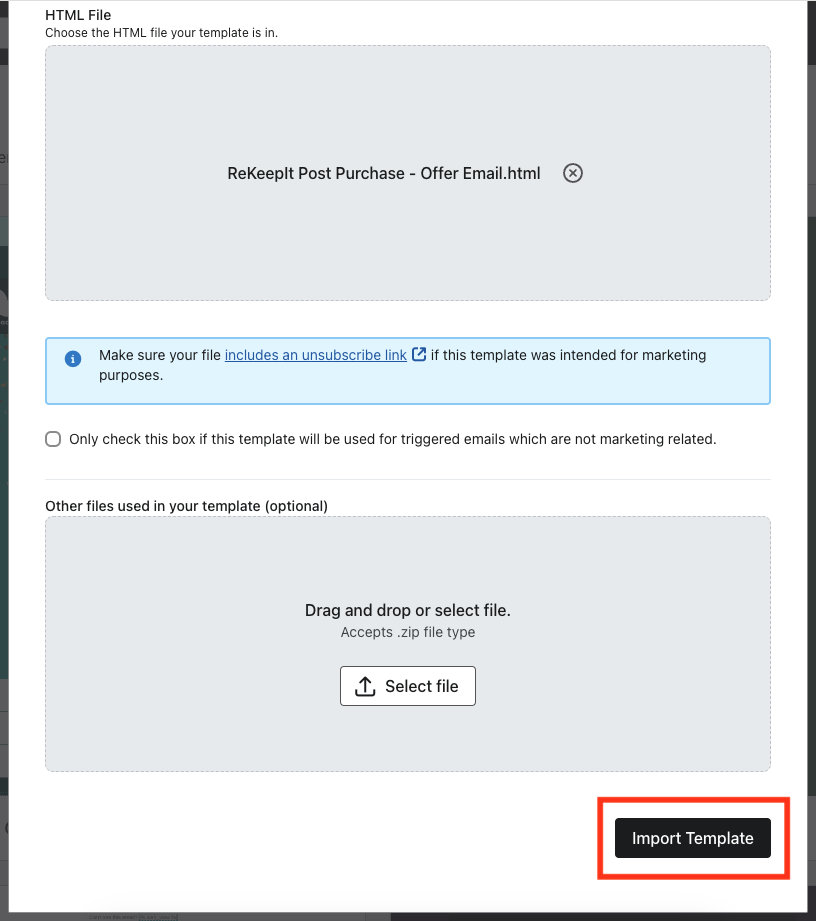
-
Import Template:
- Template Name:
ReKeepIt Post Purchase - Offer Email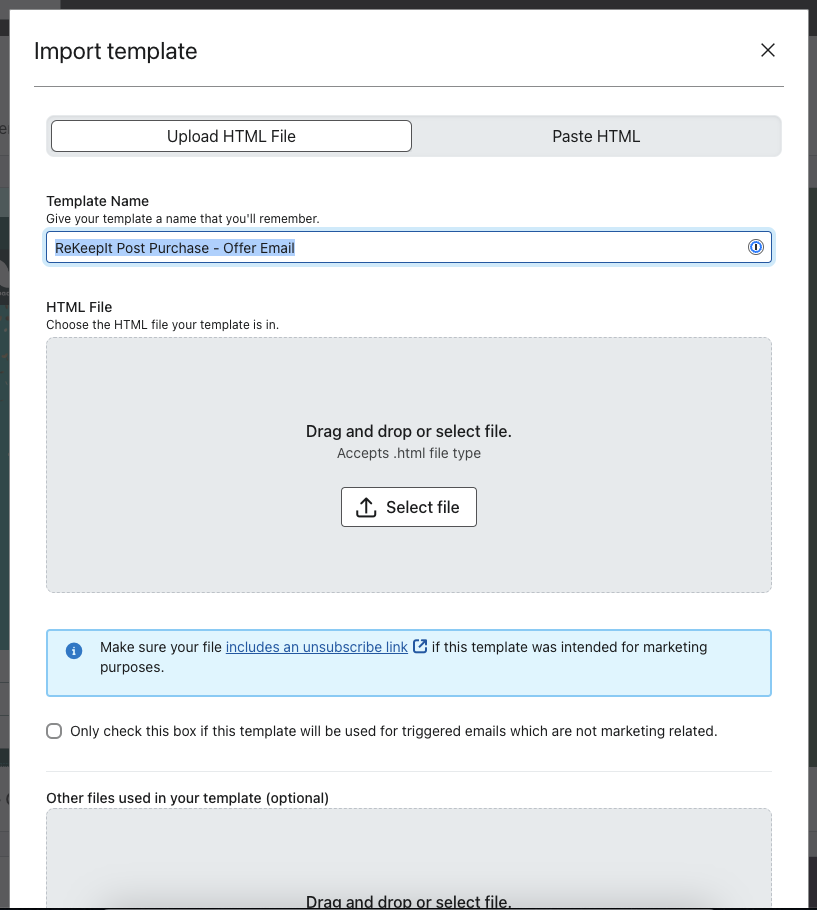
- Select
Upload HTML FileorPaste HTML
- Template Name:
Upload discount email template
Upload the email template:
-
Go to
https://www.klaviyo.com/templates/themed -
Import Template:
- Template Name:
ReKeepIt Post Purchase - Discount Email - Select
Upload HTML FileorPaste HTML
- Template Name:
After successfully uploading the template, the next step is to integrate it into the workflow. It's important to remember that this template is fully customizable. You have the flexibility to modify, update, or even replace it entirely at any point to better align with your brand's evolving identity and requirements.
Flow setup
Offer Flow
This flow will send the campaign email to offer the final sale in exchange for a discount.
The trigger for this is the event named: RKI-POST Offer. It follows the
Klaviyo
documented payload
with additional properties.
Creating the Offer Flow
To set up the offer flow, please follow these steps:
- Navigate to Klaviyo's flow creation page at
https://www.klaviyo.com/flows/create.
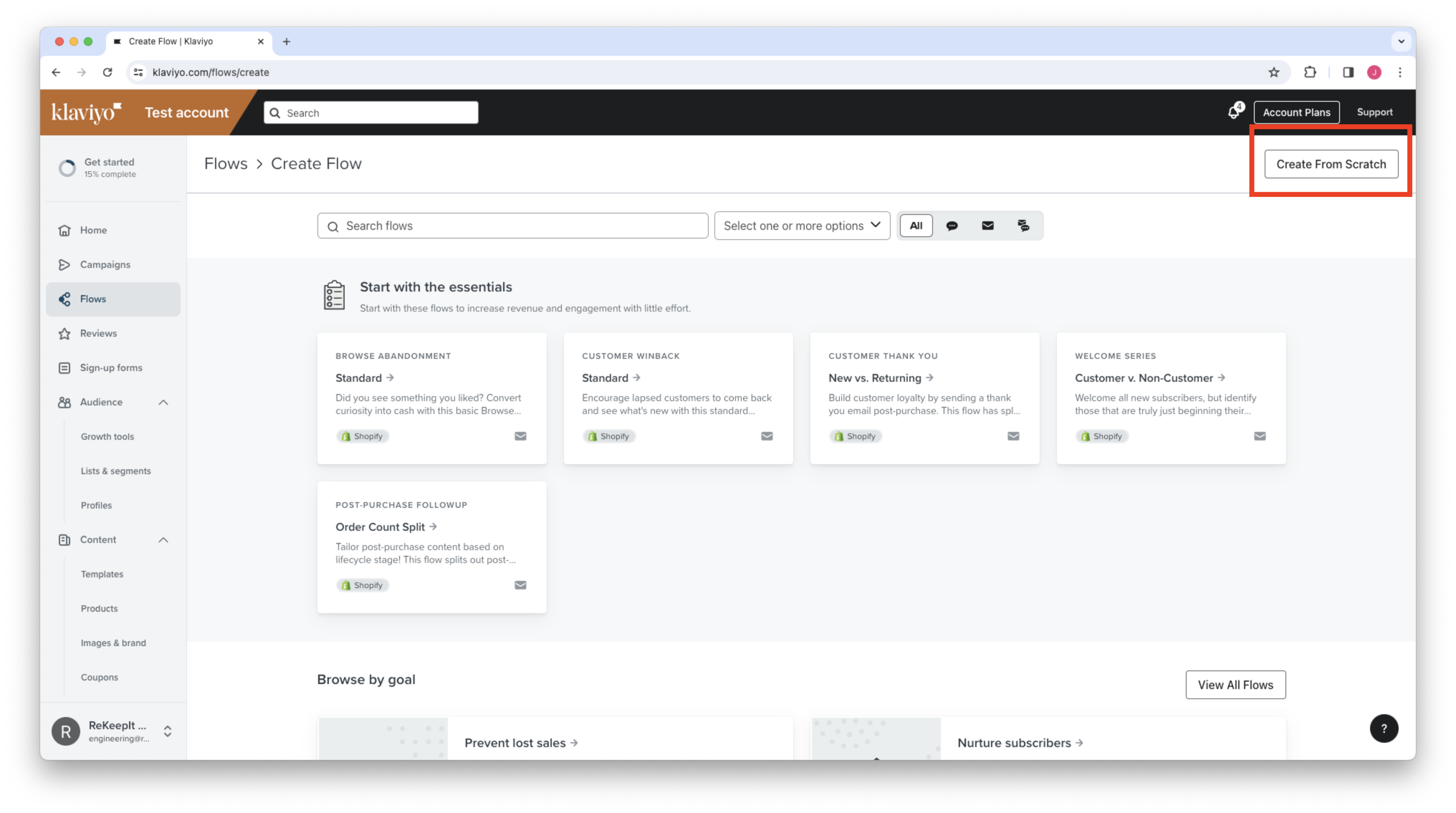
- Click on
Create From Scratchlocated in the top right corner. - Enter the name
ReKeepIt Post-Purchase - Offer Emailfor your flow and clickCreate Flow.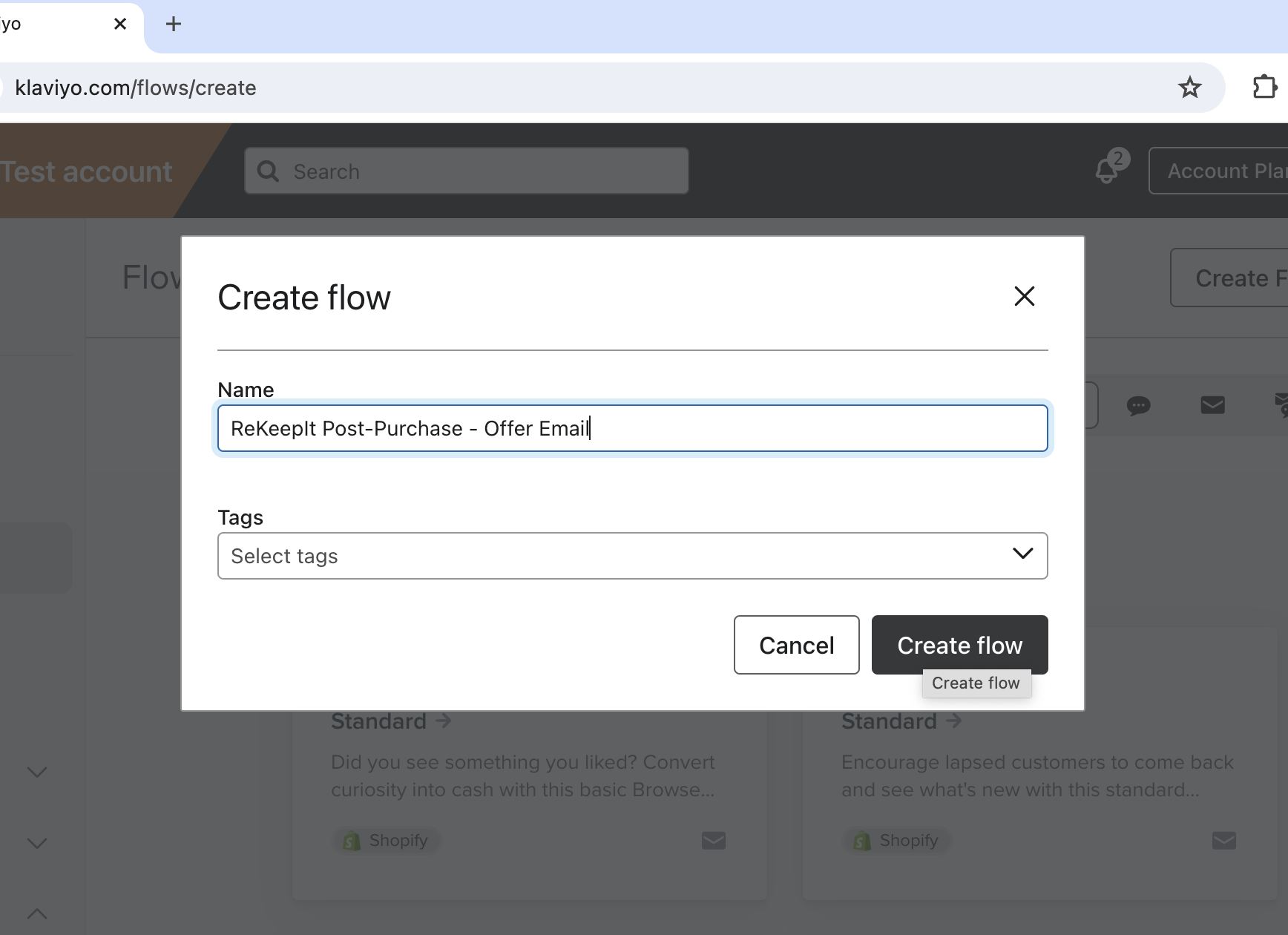
- Access the
Metricstab.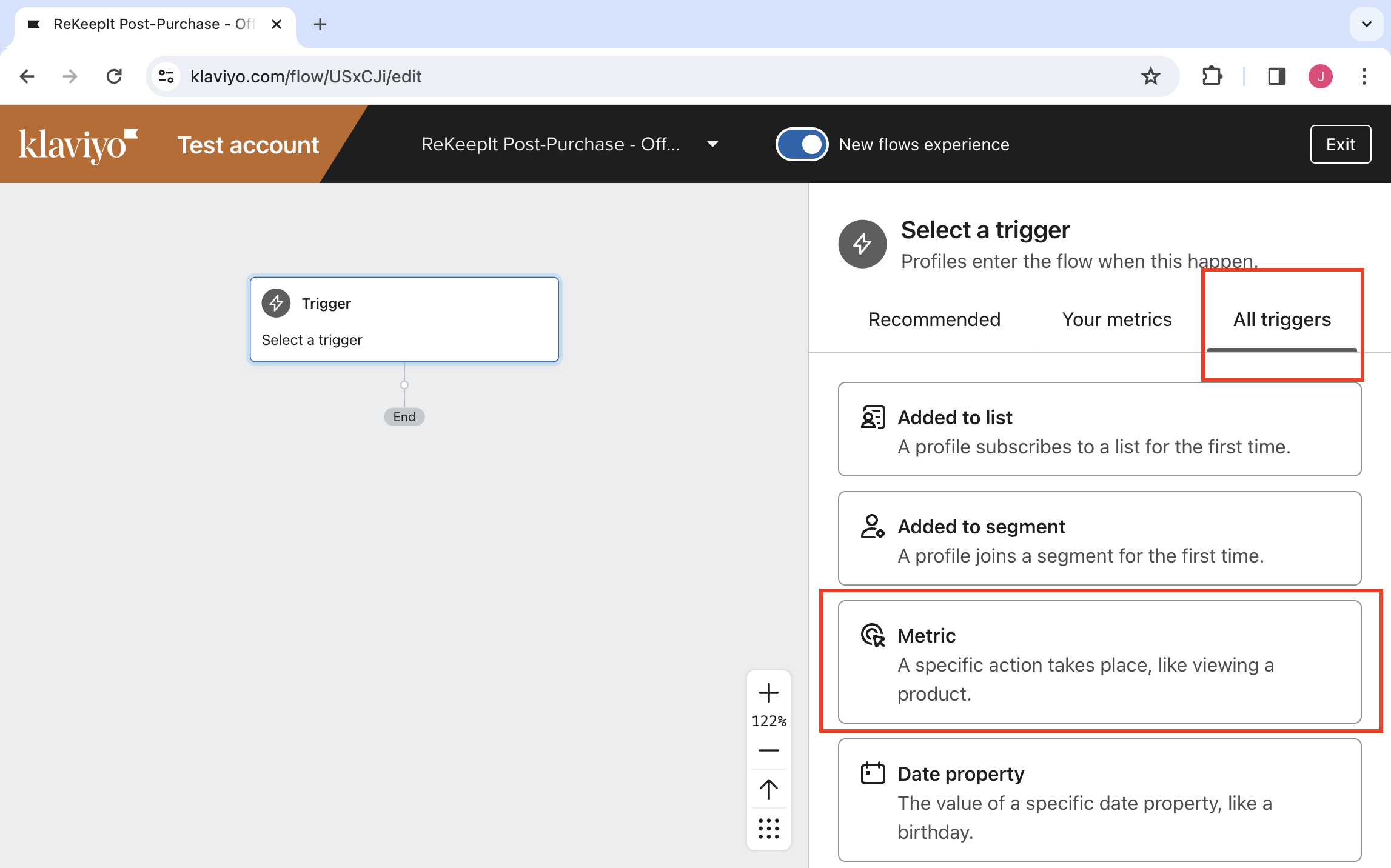
- Search for and select the
RKI-POST Offertrigger. - Confirm your selection and save.
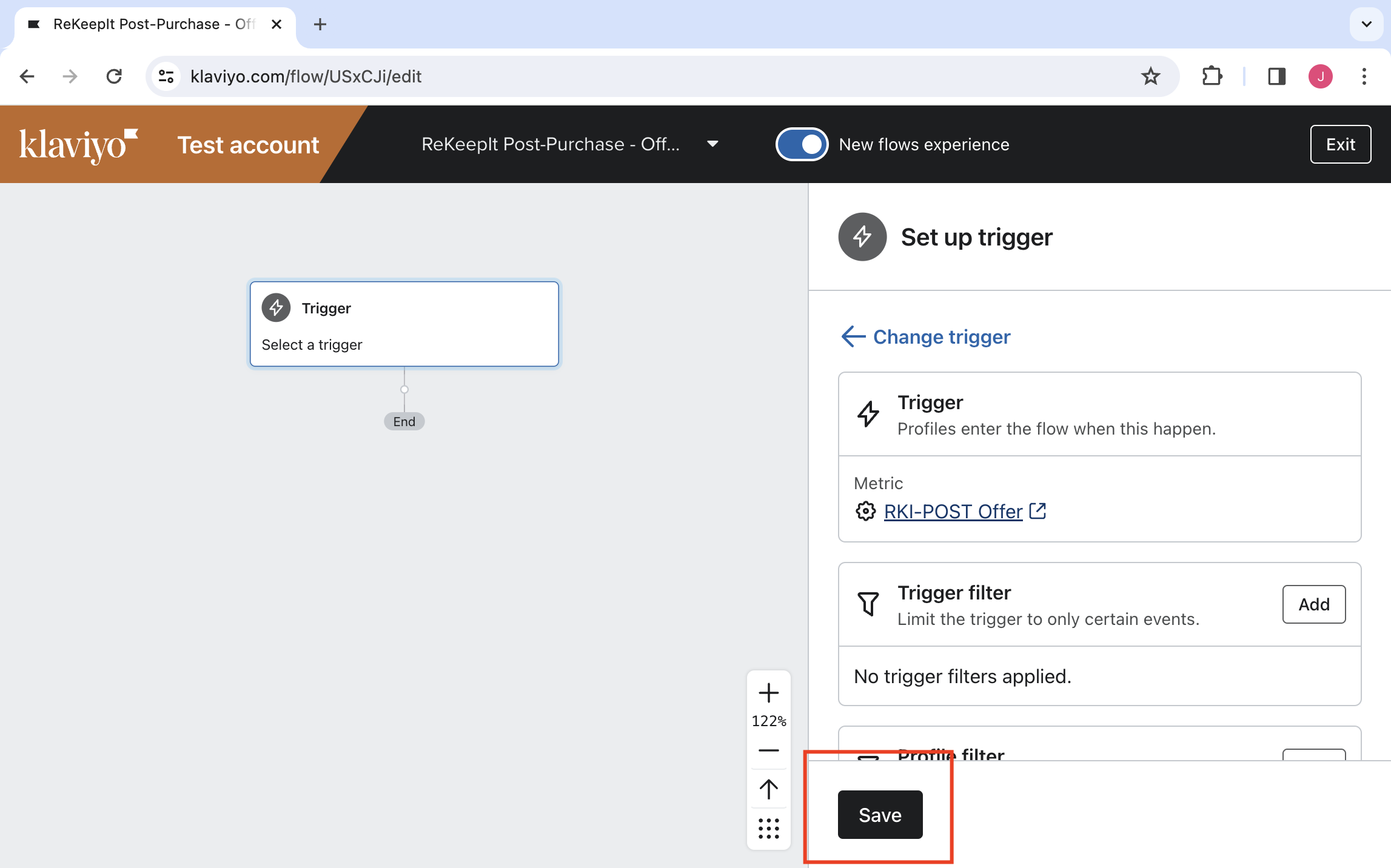
- Drag an email box under the trigger and select it.
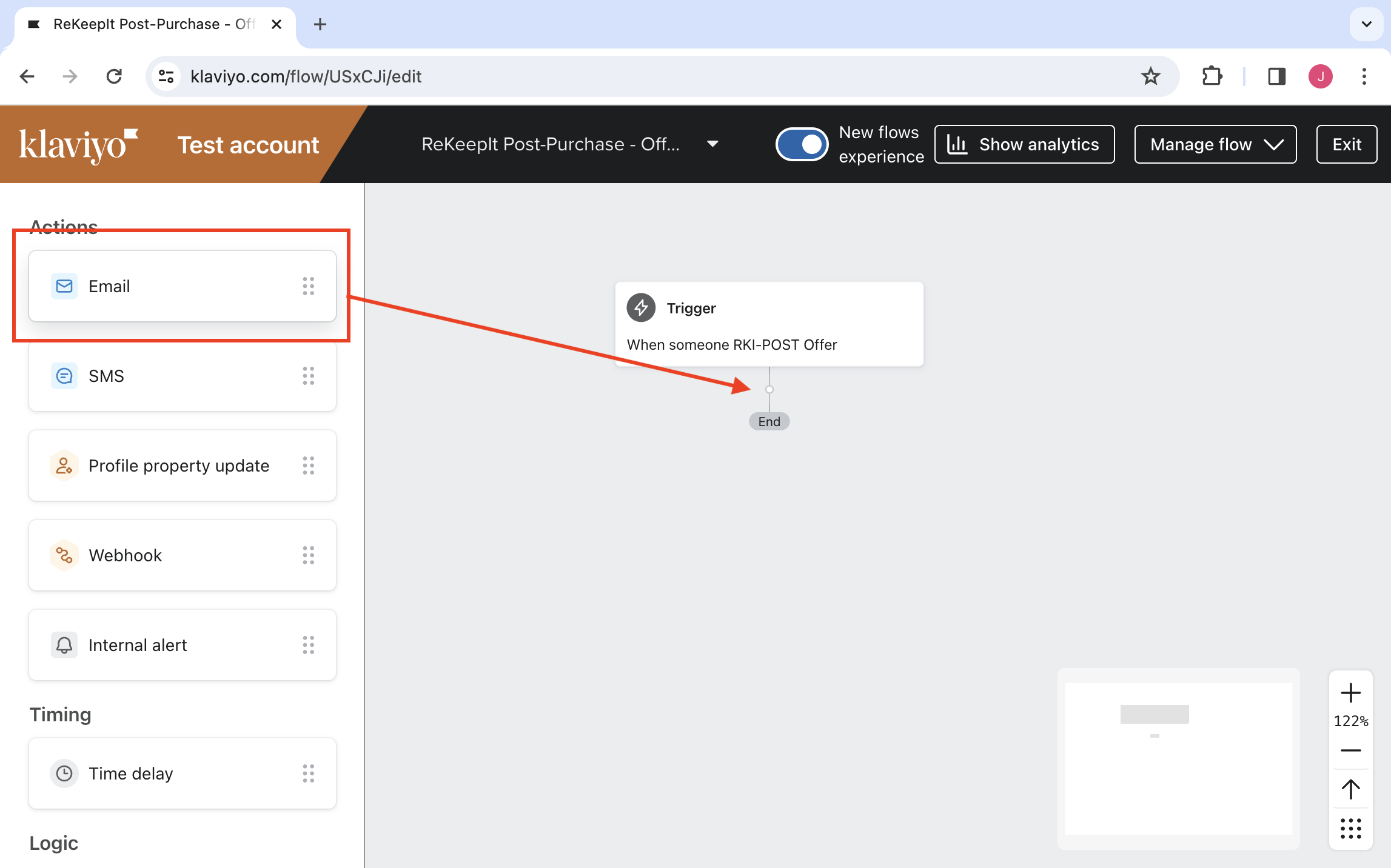
- Configure the email settings:
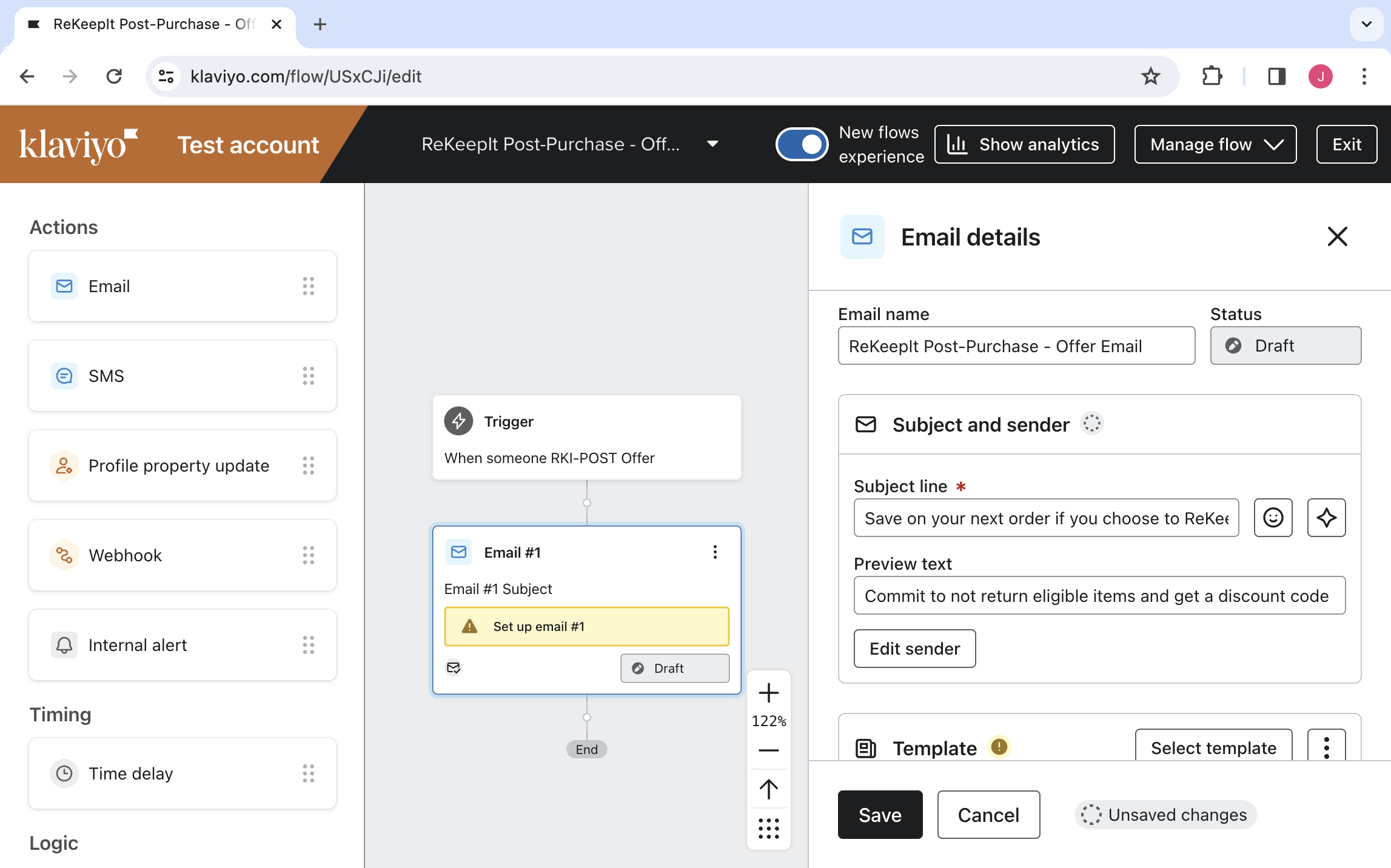
- Name:
ReKeepIt Post-Purchase - Offer Email - Subject line:
Save on your next order if you choose to ReKeepIt - Preview text:
Commit to not return eligible items and get a discount code to use towards your next purchase - Important: Ensure to click Save before proceeding, as the next step will redirect you to a new page.
- Name:
- Template Selection:
- Choose
Select Template.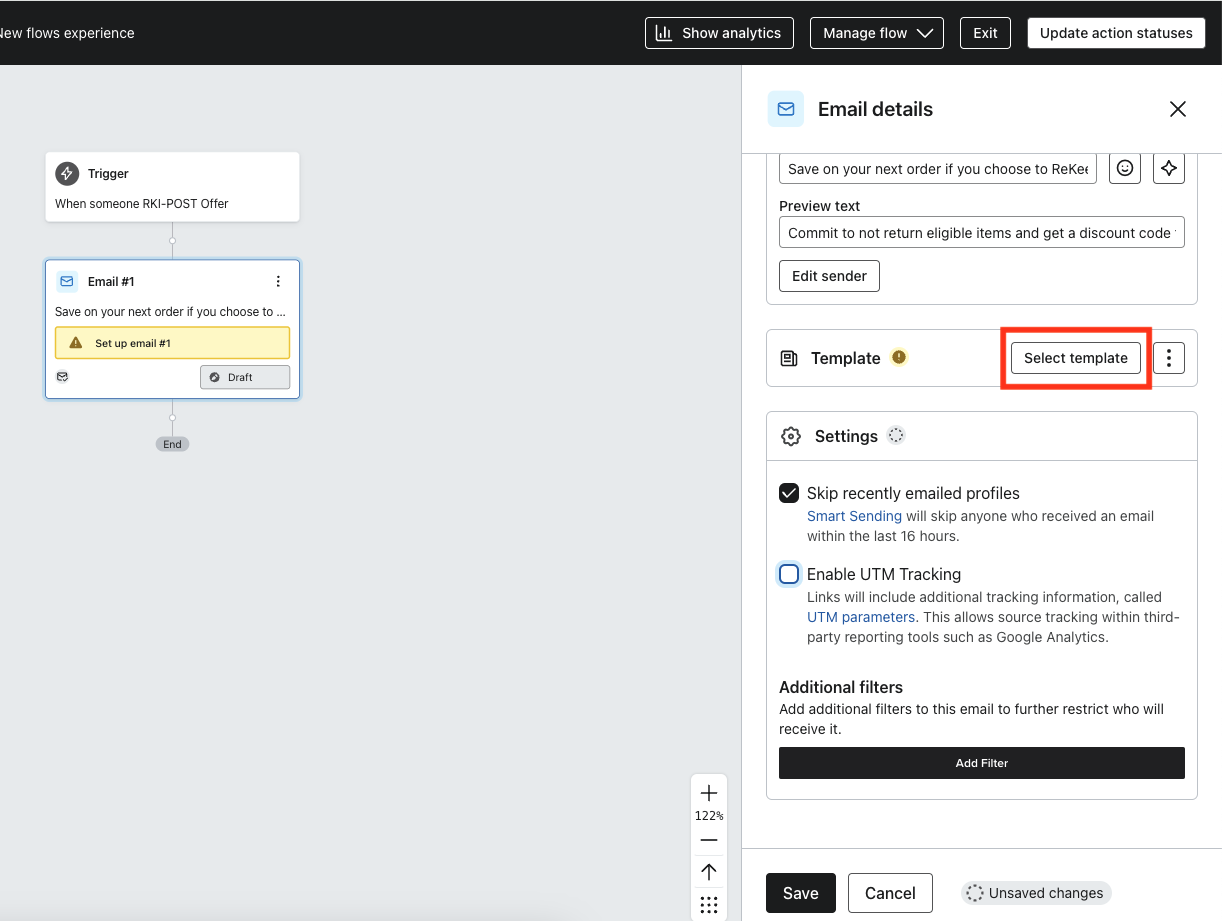
- Go to the
Saved Templatestab.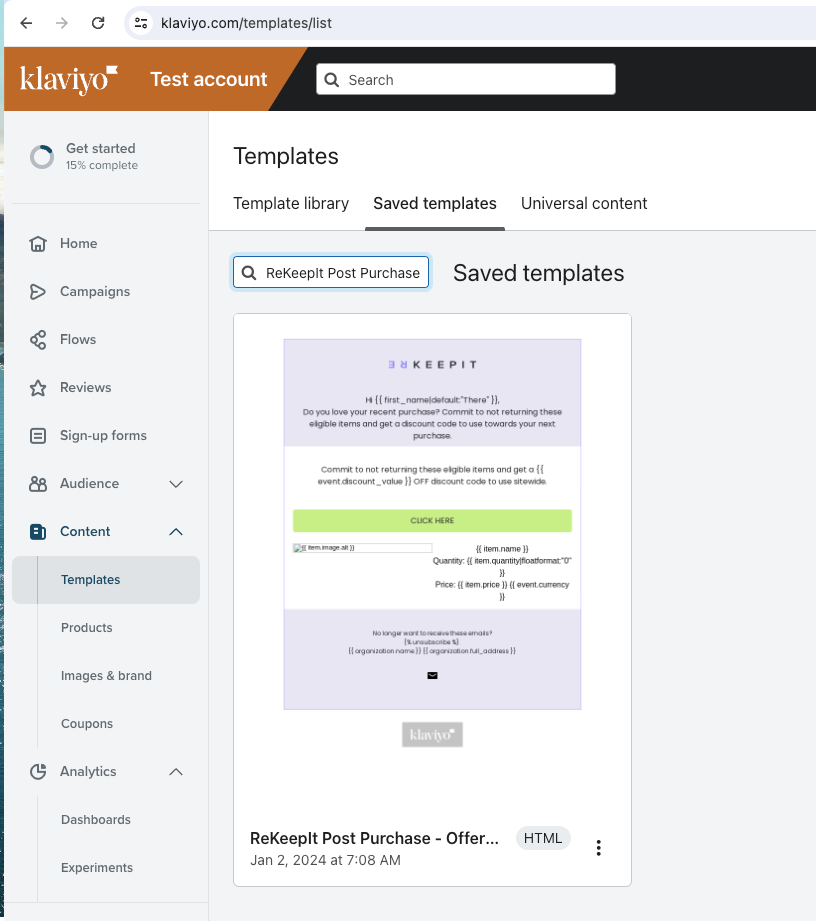
- Find and select
ReKeepIt Post Purchase - Offer Email. - Use
Use Template.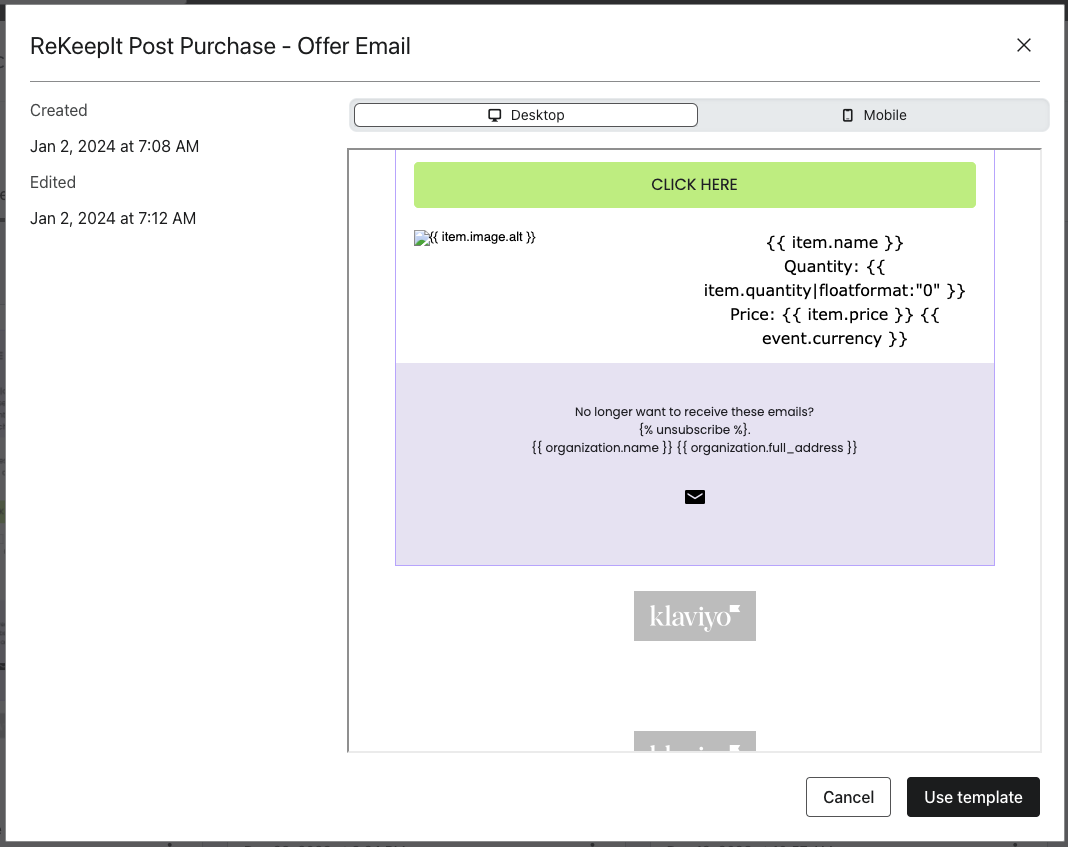
- Remember to save your changes.
- Click
Done.
- Choose
After selecting the template, update the action status:
- Click
Review and turn on.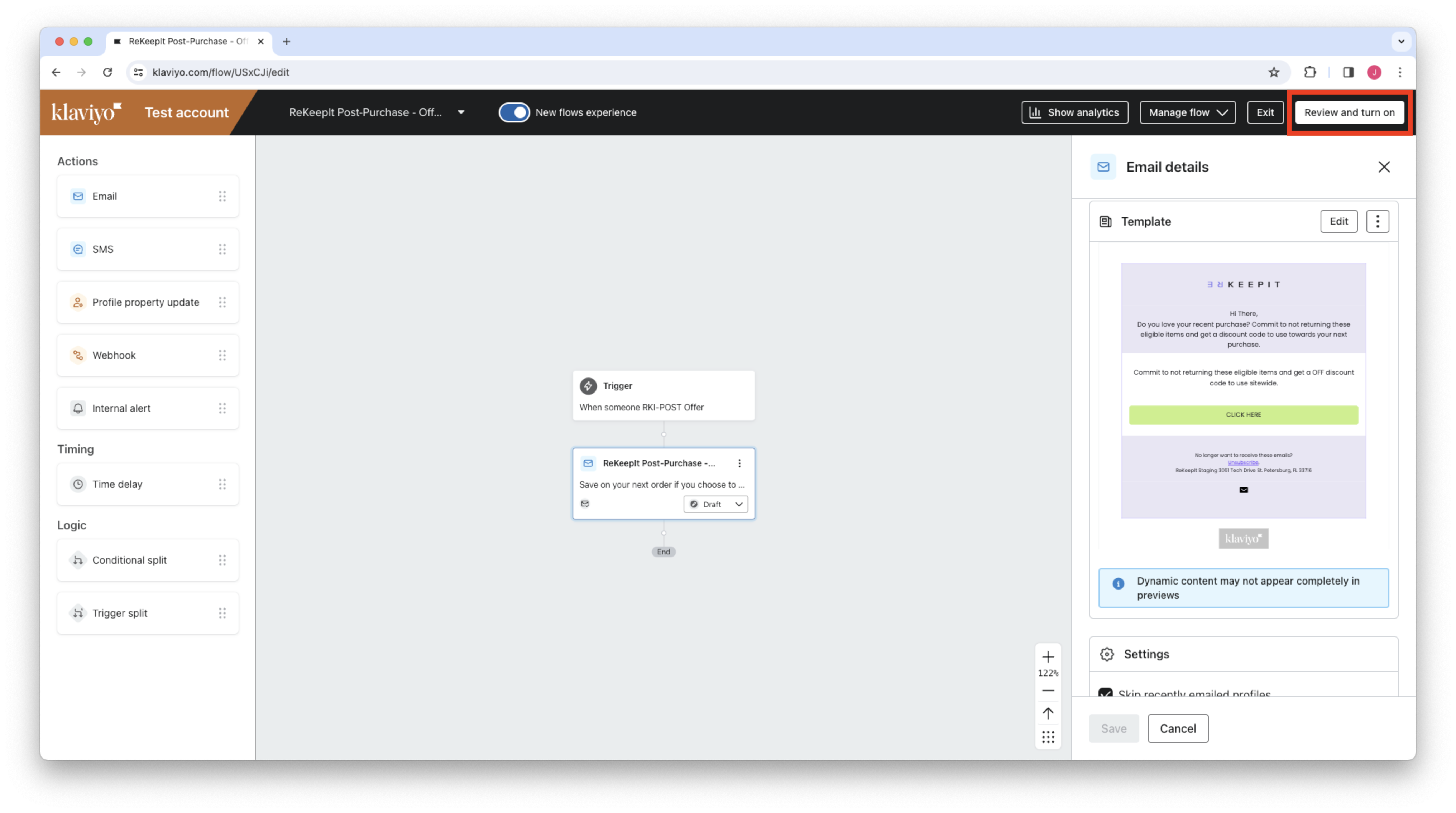
- Change Action Status to
Manual.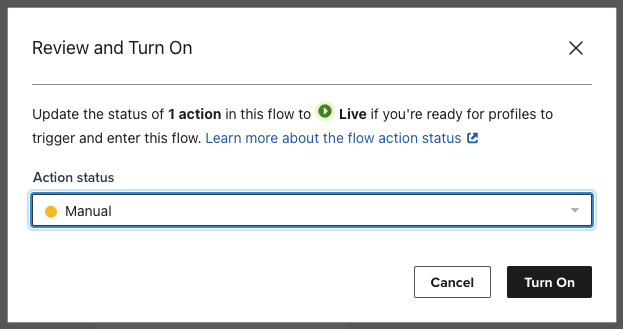
- Initially monitor the emails to ensure everything functions correctly. Feel free to update or replace the template to better fit your brand's style.
- Finally, click
Exitand proceed to set up the discount flow.
Creating the Discount Flow
Once the customer agrees to the final sale, we blocklist the order with the return vendor, and generate a discount for them.
The trigger for this event is named: RKI-POST Discount Generated.
To set up the discount flow, please follow these steps:
- Navigate to Klaviyo's flow creation page at https://www.klaviyo.com/flows/create.
- Click on
Create From Scratchlocated in the top right corner. - Enter the name
ReKeepIt Post-Purchase - Discount Emailfor your flow and clickCreate Flow. - Access the
Metricstab. - Search for and select the
RKI-POST Discount Generatedtrigger. - Confirm your selection and save.
- Drag an email box under the trigger and select it.
- Configure the email settings:
- Name:
ReKeepIt Post-Purchase - Discount Email - Subject line:
Your discount code is inside! - Preview text:
We received your request to commit to not returning your purchase - Important: Ensure to click Save before proceeding, as the next step will redirect you to a new page.
- Name:
- Template Selection:
- Choose
Select Template. - Go to the
Saved Templatestab. - Find and select
ReKeepIt Post Purchase - Discount Email. - Use
Use Template. - Remember to save your changes.
- Click
Done.
- Choose
After selecting the template, update the action status:
- Click
Review and turn on. - Change Action Status to
Manual. - Initially monitor the emails to ensure everything functions correctly. Feel free to update or replace the template to better fit your brand's style.
- Finally, click
Exit.
Using event data from custom email templates
You can create custom email templates from scratch to perfectly align with your brand's distinct identity. You have full control over the design and styling, but it's essential to incorporate the following mandatory fields.
Utilize Klaviyo's template syntax to access event-related fields for your
templates. For comprehensive guidance, refer to the
Klaviyo documentation.
In summary, property attributes are accessible using the event prefix. As an
example, {{ event.opt_in_link }} in Klaviyo templates fetches the opt-in link.
first_name is also available through Klaviyo, linking event and profile data.
Fields for the Offer Event
The offer event provides these key fields:
opt_in_link(string)currency(string)discount_value(string, e.g., $10.00)subtotal_price(string, e.g., $100.00)line_items(array of objects)
Within line_items, you'll find these sub-fields:
nametitlepricequantityimage.srcimage.alt
For guidance on rendering line_items as a dynamic table, visit this
Klaviyo article.
When employing "Row Alias" with line_items, consider the following structure
for the offer event payload:
{
    "data": {
        "type": "event",
        "attributes": {
            "metric": {
                "data": {
                    "type": "metric",
                    "attributes": {
                        "name": "RKI-POST Offer"
                    }
                }
            },
            "profile": {
                "data": {
                    "type": "profile",
                    "attributes": {
                        "email": "email@example.com"
                    }
                }
            },
            "properties": {
                "order_id": 1234,
                "email": "email@example.com",
                "opt_in_link": "https://rekeepit.com/api/post-purchase/opt-in?order_uuid:83DE95B4-3C86-477A-B1E5-40E3EEDED984",
                "currency": "USD",
                "discount_value": "$10.00",
                "subtotal_price": "100",
                "line_items": [
                    {
                        "product_id": 4567,
                        "name": "Item Name",
                        "title": "Item Title",
                        "price": "100",
                        "quantity": "1",
                        "image": {
                            "alt": "Product Title",
                            "src": "https://example.com"
                        }
                    }
                ]
            },
            "unique_id": "83DE95B4-3C86-477A-B1E5-40E3EEDED984"
        }
    }
}
Fields for the Discount Event
For the discount event, these fields are relevant:
discount_value(string)discount_code(string)
The structure for the discount event payload is as follows:
{
    "data": {
        "type": "event",
        "attributes": {
            "properties": {
                "discount_code": "discount_code",
                "discount_value": "$0.00"
            },
            "value": 0,
            "metric": {
                "data": {
                    "type": "metric",
                    "attributes": {
                        "name": "RKI-POST Discount Generated"
                    }
                }
            },
            "profile": {
                "data": {
                    "type": "profile",
                    "attributes": {"email": "email@example.com"}
                }
            },
            "unique_id": "D019590E-B56A-4F2B-A640-E1091B0ED0F1"
        }
    }
}